Guest Satisfaction Report
The Guest Satisfaction report allows users to track the guest satisfaction records created by guests at a property.
Perform the following steps to generate the report:
Navigate to Reports ➜ Dynamic Reports ➜ Guests/Reservations ➜ Guest Satisfaction.
Refer to the following table and fill in the fields.
|
Field |
Description |
|---|---|
|
Report Name |
Guest Satisfaction. |
|
Start Date |
The start date for report generation. This is a mandatory field that allows users to select a any date in the past up to the current property date. Future dates cannot be selected. |
|
End Date |
The end date for report generation. This is a mandatory field that allows users to select a any date in the past up to the current property date. Future dates cannot be selected. |
|
Guest Satisfaction Type |
This is an optional multi-select drop-down list that allows users to select from the following options:
|
|
Category |
This is an optional multi-select drop-down list that allows users to select from the various categories for which the guest satisfaction records are created for a property. |
|
Severity |
This is an optional multi-select drop-down list that allows users to select from the severity of the guest satisfaction records created for a property. |
|
Status |
This is an optional multi-select drop-down list that allows users to select from the status of the guest satisfaction records created for a property. |
|
Guest Email |
When selected, the records are retrieved based on the guest’s email address. |
|
Guest Phone |
When selected, the records are retrieved based on the guest’s phone number. |
Click Run to generate the report.
Click Save to save the report under User Favorites section.
Sample Report
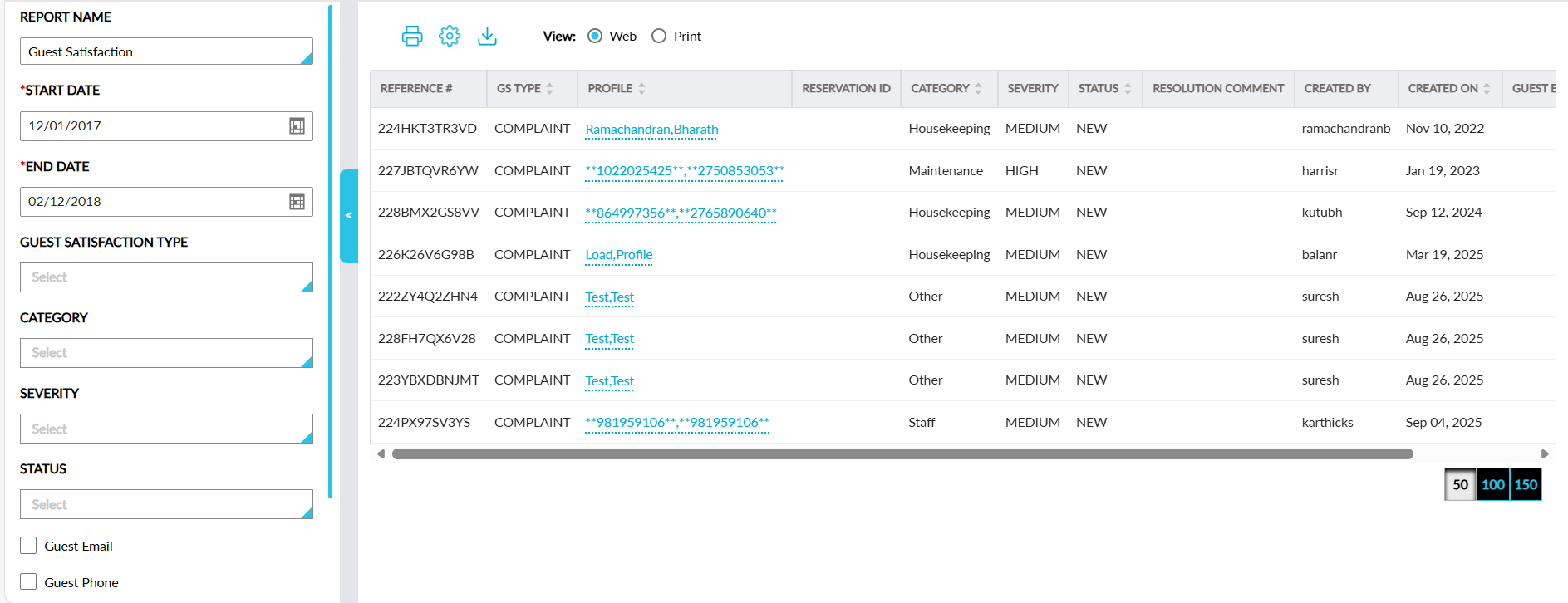
Report Fields
This report displays the following fields:
|
Field |
Description |
|---|---|
|
Reference # |
The reference number of the guest satisfaction record created. |
|
GS Type |
The guest satisfaction type for which the record was created. This column can be sorted. |
|
Profile |
The guest profile used for creating the record. This column can be sorted. |
|
Reservation ID |
The confirmation ID of the reservation associated with the record. |
|
Category |
The category based on which the record was created. This column can be sorted. |
|
Description |
The description configured by the guest for the record. |
|
Severity |
The severity of the record. |
|
Status |
The status of the record. This column can be sorted. |
|
Resolution Comment |
The resolution comment provided by the user. |
|
Created By |
The user who created the record. |
|
Created On |
The date when the record was created. This column can be sorted. |
|
Guest Email |
The email address of the guest associated with the record. |
|
Guest Mobile |
The mobile number of the guest associated with the record. |